

AI Overview
Dialer.CX has built-in AI that powers call intelligence, automation, and agent assistance. Every AI feature is configured from a single settings hub with encrypted key storage and usage tracking.
What AI Does
Section titled “What AI Does”| Feature | What It Does |
|---|---|
| Transcription | Converts call recordings to searchable text with speaker identification |
| Call Analysis | Sentiment scoring, compliance checking, key moment detection |
| Lead Scoring | Prioritizes leads based on engagement signals and call history |
| AI Chatbots | Autonomous voice agents that handle calls without human intervention |
| Text-to-Speech | Generates natural-sounding IVR prompts and voicemail messages |
| AMD Detection | Distinguishes answering machines from live humans |
| Call Summaries | Auto-generated conversation synopses |
| Analytics Insights | AI observations about performance trends |
| Pacing Advisor | Recommendations for optimal dial levels |
Configuration
Section titled “Configuration”All AI settings are managed from Admin > AI Settings with five tabs:
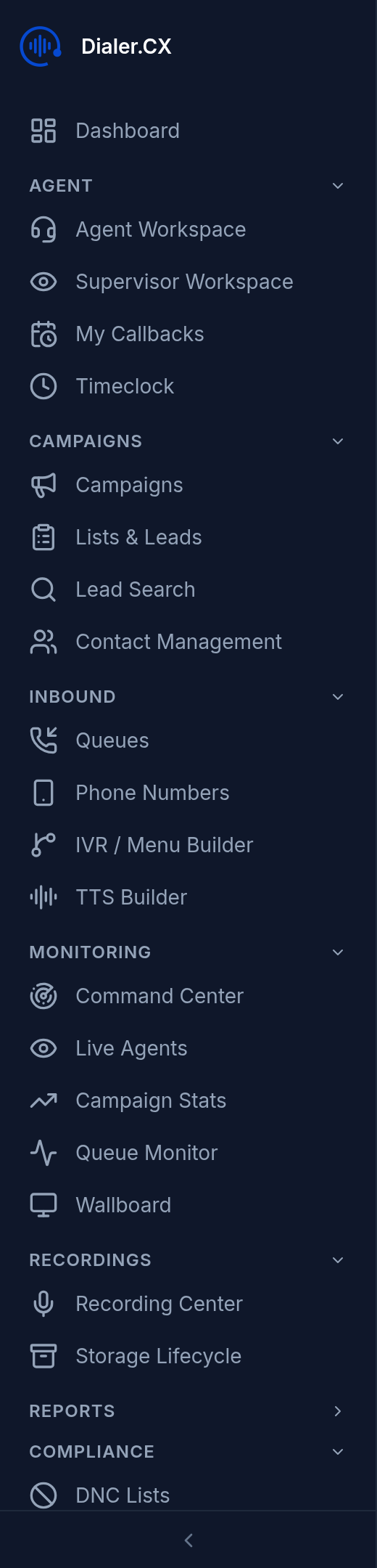
- API Keys — enter your provider credentials (stored encrypted). Only configure the providers you plan to use.
- Transcription — select provider, model, language, and auto vs. on-demand mode
- Analysis — select provider, model, and which analysis features to enable
- AMD Processing — configure AI-assisted voicemail detection thresholds
- Text-to-Speech — select voice, model variant, and preview audio before deploying
Cost Tracking
Section titled “Cost Tracking”All AI usage is metered and tracked automatically:
- Per-call cost attribution — every API call is logged with its cost
- Daily and monthly aggregation — see spending trends over time
- Breakdown by feature — transcription, analysis, TTS, and AMD tracked separately
- Budget visibility — understand costs before scaling up